Key Things to Know
- NoviSign launched Studio AI, a tool that turns a spoken or typed prompt into a complete digital signage screen.
- It’s built directly into NoviSign Studio and runs on OpenAI’s GPT models.
- Users can update existing screens by describing the change instead of editing each element by hand.
- The tool connects to a platform that manages more than 70,000 active screens worldwide.
- Studio AI is available now in beta, with several complimentary prompts to start.
What Is NoviSign Studio AI?
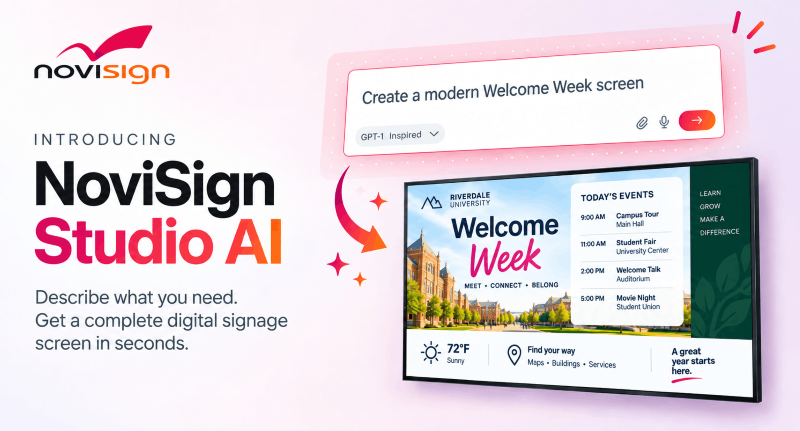
NoviSign Studio AI is a new AI-driven way to create, edit and manage digital signage content, the company announced this week. Built into the NoviSign platform, it replaces the traditional blank-canvas workflow with a conversation. Users describe the screen they need, and Studio AI generates the content, imagery, layout and visual hierarchy. That cuts the time and effort required to produce a finished creative.
How Does Studio AI Turn a Prompt Into a Screen?
Studio AI turns a prompt into a screen by interpreting a user’s request and building a complete creative around it. Users can type a request, speak through the microphone or attach their own assets, including logos and product images. Powered by OpenAI’s GPT models, the tool reads those instructions and produces a full digital signage creative. The result stays fully editable. Users can keep refining it through the AI conversation, switch to NoviSign’s drag-and-drop editor for manual control or move between the two at any point.
Can Users Update Existing Signage by Asking?
Yes, users can update existing NoviSign creatives and AI-generated screens simply by describing the change they want. When information shifts, they can explain the update rather than hunting down each affected element. For example, a café manager can ask Studio AI to create a promotion for a new iced coffee, then request a price change or add a product image. The tool applies the update while keeping the overall design consistent. Users can also ask it to simplify a crowded screen, emphasize key information, align a design with their brand or translate a full creative for different regions and audiences.
How Does Studio AI Fit Into Real-World Signage Workflows?
Studio AI fits into real-world workflows because it’s part of the cloud-based NoviSign platform, which currently manages more than 70,000 active screens worldwide. Unlike standalone generative tools, creatives move directly into the same workflow organizations already use to preview, save, schedule, publish and manage content across their networks. That connection links AI-assisted creation with content management and publishing, supporting the full path from an idea to every screen.

What Does NoviSign’s Leadership Say?
NoviSign says the tool is a way to move from concept to finished design faster. “NoviSign Studio AI brings new ideas to life in a fraction of the time,” says Gil Matzliah, CEO of NoviSign. “What once required design skills and considerable effort can now be done quickly, with beautiful results that match the user’s vision. Users can explore several alternatives, choose the best, and spend more time creating and less time on execution.”
When Can Integrators Use It?
Integrators can use Studio AI now, as it’s available in beta directly within NoviSign Studio. Users can test the experience with several complimentary prompts, and additional access options come through NoviSign subscriptions.