
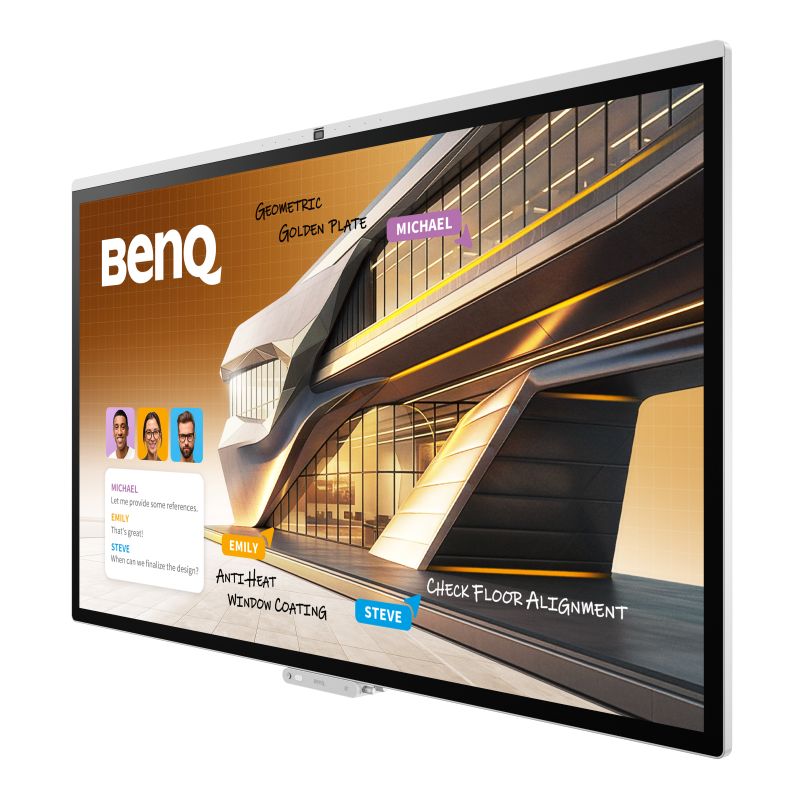
Editor’s Note: This review of the BenQ Board CP05 reflects the author’s impressions based upon Commercial Integrator’s testing. Previously, Commercial integrator has reviewed other BenQ solutions.
If I had to sum up the single theme that integrators and their IT counterparts most frequently return to, it would be their fervent desire for a “frictionless” meeting-room technology estate. These days, rooms don’t frustrate because they lack features; they usually frustrate because too many discrete systems (e.g., conferencing platforms, wireless sharing, room scheduling, interactive whiteboards) occupy the same space. Every extra login screen, app and cable connection causes friction that can diminish confidence in the room and delay productive collaboration.
I often say that I’m a journalist, not a technologist. This makes me a suitable stand-in for the average end user walking into a meeting room. Like them, I want things to “just work.” So, when I had the opportunity to get hands on with the BenQ Board CP05 — specifically, the 55-inch unit, model CP5505 — my first order of business was to investigate whether BenQ delivers on its promise to let teams “Meet Your Way.” Does the board reduce friction? Does it minimize complexity and actually make it easier for teams to get to work?
I also wanted to understand how well the BenQ Board CP05’s feature set, including inbuilt AI capabilities, aligns with today’s enterprise adoption needs versus what collaborators will expect over the next three to five years.

BenQ Board CP05: Components and Initial Setup
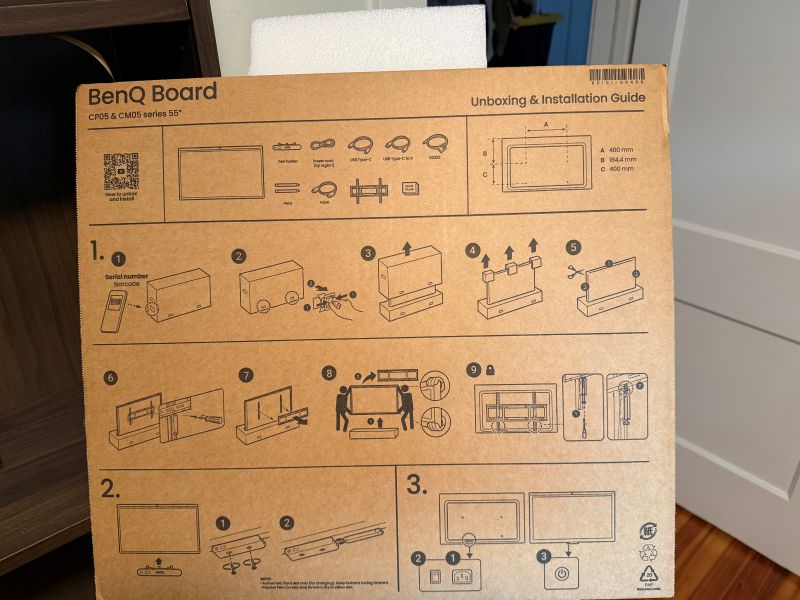
Photo courtesy of Emerald/Commercial Integrator.
The BenQ Board CP05 is packaged extremely securely, offering peace of mind for integrators wary of the potential for transit or handling-related damage. Styrofoam blocks hold the board firmly in place, and it arrives contained within a protective silvery bag. When fully boxed up, the package weighs 90lb. and measures nearly 55 inches wide, making it far too unwieldy for one person. To wit, before I recruited someone to help me, I struggled even to remove the board from the cardboard box. (Full disclosure: As a non-technical type, I had the initial thought of lifting the board out of the box by hand. After reviewing the included Unboxing and Installation Guide, however, I quickly realized the proper protocol is to unsheathe the board by lifting the box up and off, rather than pulling the board up and out.)
Included Components
Out of the box, the CP05 ships with active and passive touch pens, an HDMI cable, a Type-C cable, a Type-C-to-A cable, an RS232 cable and typical regulatory and setup information. To allow Commercial Integrator to test a typical real-world setup, BenQ supplied not only the 55-inch board but also a heavy-duty rotating rolling stand (an optional accessory) that allows 90-degree rotation between portrait and landscape. For integrators whose clients need display-orientation flexibility, it’s worth setting aside some budget to add the rolling stand to the spec. The standard alternative is fixed wall mounting.
Apart from the Unboxing and Installation Guide, what also made the shift from unboxing to first use easier was the absence of a required proprietary app. This is a refreshing departure from what seems to have become an industry norm. With BenQ, it’s truly as simple as mounting or standing the board, powering it on via a standard AC power connection and logging in.
Login, Personas and Room Management
I bench-tested the board right out of the box, not relying on the corporate login model typical of a real-world enterprise deployment. Even so, it’s worth underlining that BenQ doesn’t force a choice between security and speed when enterprise users log in.
In a professional setting, users can authenticate via QR code or single sign-on credentials tied to their company’s existing identity provider (e.g., Microsoft 365, Google Workspace), as well as via NFC card if one is provisioned by their organization. Once logged in, cloud drives, calendars and other personalized resources follow the user across deployed boards. Automatic logout when the user taps into another board elsewhere, as well as automatic timeout, ensures that personas don’t linger after a meeting ends.
Inbuilt Room Scheduling
Inbuilt room-scheduling capabilities mean that, in an enterprise setting, users can check room availability, see when the next meeting is scheduled and book a meeting in the meantime, all through the board and with minimal friction.
BenQ doesn’t force organizations to pick a platform camp, either. The CP05 allows team members accustomed to Google Workspace and team members acclimated to Microsoft 365 to walk into the same room and each use the tools they already know. This “choose your own adventure” approach is a compelling answer to modern offices’ mixed-ecosystem reality, where Microsoft, Google, Zoom and other ecosystems increasingly coexist under one roof.
That platform-agnosticism carries over to wireless sharing, too. The CP05 is designed to support Miracast, AirPlay and Chromecast, along with BenQ’s own InstaShare2 app. I limited my testing to AirPlay, and I found it cast to the board seamlessly without requiring a physical plug-in.
Perhaps most notably, the capabilities are subscription-free and don’t entail additional cost after the board’s purchase. It’s all too common for IT teams to be surprised by “free at first, then a per-seat license” scenarios. The absence of this makes the CP05 particularly appealing.
Meeting Performance: Camera, Audio and On-Device AI
The CP05 is built around an eight-core processor paired with a dedicated 10 TOPS AI processor, which BenQ uses to support AI processing at the edge rather than routing everything through the cloud. This keeps sensitive meeting information on the device, rather than routing it to a third-party cloud service. That fact should ease the minds of IT and security teams who are understandably wary of AI adoption.
So, what does an on-device AI processor bring to a meeting room? The clearest answer is SummarAI, which “listens” through a meeting and generates a summary, transcript and meeting minutes without a human having to take notes. Although AI note-taker functionality is imperfect across the board — from Teams to Otter to Zoom — given the software’s unfamiliarity with proper nouns, technical terms and unintelligible voices, SummarAI’s output is capable of meeting contemporary collaborators’ expectations. Just as important, organizations that aren’t ready to embrace AI across every workflow aren’t forced to do so; the functionality can be used when and where it makes sense.
Video-Related Specs
On the video side, the CP05 pairs a 50-megapixel 4K camera (160° diagonal / 120° horizontal / 80° vertical field of view) with eight AI-selectable camera modes. Intelligent framing and voice tracking can keep up with the natural cadence of the room and can keep speakers’ faces visible to enhance real-time collaboration.
Relying on PCAP touch technology, the BenQ Board CP05 supports up to 50 simultaneous points of contact, allowing multiple participants to annotate, brainstorm and work on content at once. Hands-on testing revealed an experience comparable to everyday smartphone or tablet interactions, with negligible latency and few missed strokes. And that’s exactly what collaborators want: an experience where technology facilitates productivity rather than distracting from it.
The board’s eight-microphone omnidirectional array is rated for pickup up to nearly 40 feet. Hands-on testing found that audio pickup remained solid even toward the outer edge of the rated range. This is likely attributable to inbuilt echo cancellation, noise suppression and speech enhancement, which separate signal from noise and push out the usable pickup range.
Built-in audio on the 55-inch model comes from dual 15W speakers, which should prove adequate for most midsize rooms. (The 55-incher’s big brother, the 75-inch model CP7505, turns the audio power up a notch, delivering 90W between two 25W speakers and a 40W subwoofer.)
BenQ Board CP05: Color Accuracy, Specialty Modes
Perhaps the CP05’s biggest differentiator, when compared to competing conference room displays, is its visual fidelity. That’s also where BenQ’s broader display heritage becomes apparent. This is a critical factor for creative agencies, marketing teams and brand stewards who won’t settle for “close enough” to Coca-Cola red or John Deere green. The board is Pantone Validated and Pantone SkinTone Validated, with 95% DCI-P3 color coverage. This reflects a genuinely differentiated level of visual fidelity, and it all shows up in sharp, crisp 4K UHD resolution.
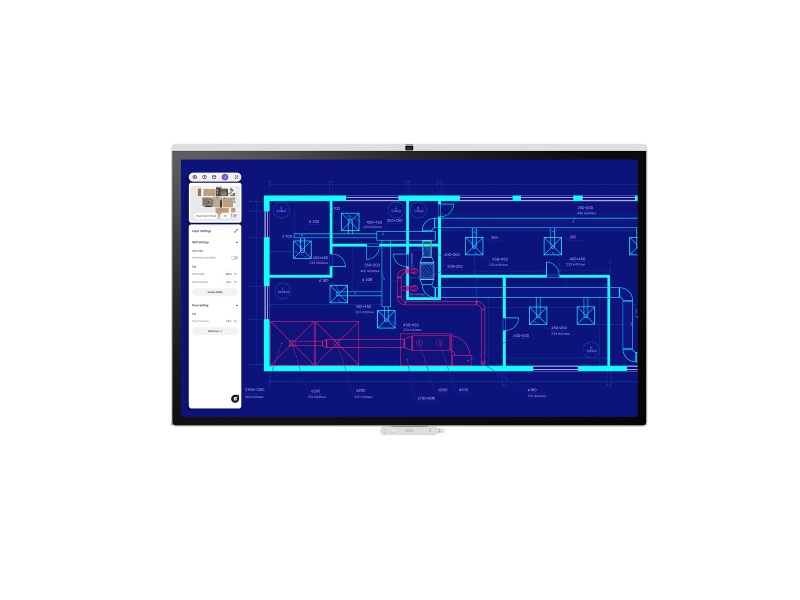
High Detail Mode is optimal for CAD drawings and engineering work. Photo courtesy of BenQ.
That visual focus extends beyond raw color accuracy, with four purpose-built display modes that allow users to tailor the experience to the task at hand. DICOM Mode is ideal for medical-grade imaging review, such as for closely examining an X-ray or MRI. High Detail Mode is optimal for CAD drawings, engineering work and similarly exacting tasks. M-Book Mode is built for color-matching MacBook displays. Finally, if a company’s legal department must perform an in-depth document review, the board offers ePaper Mode.
Lacking a wide range of content, I didn’t dive into the finer nuances of each mode. But it’s clear that BenQ is casting a wider net than most interactive collaboration displays do, reflecting a desire to position the CP05 beyond generic conferencing and toward specialized visual workflows. The smooth 90-degree rotation and auto-reorientation feeds into this. A feature unique to the 55-inch board, it allows collaborators to effortlessly adjust display orientation.
An Unexpected Differentiator: Germ Resistance
Arguably reflecting a raised societal consciousness following the COVID-19 pandemic, BenQ ensured that the CP05 is certified for germ resistance. An antimicrobial coating across every touchable surface is designed to reduce germ buildup. One might naturally associate those capabilities with K-12 classroom displays, where sticky, germy fingers are ubiquitous, but an antimicrobial coating is in fact a perfect fit for the real-time, hands-on collaboration in today’s corporate meeting spaces.
For Tech Managers, Much to Like About BenQ Board CP05
For IT and facilities teams who manage campus technology estates, there’s much to like about the CP05. Powered by the Android 15 operating system, the board allows easy downloading of apps via the Google Play Store. Perhaps what’s even more appealing for technology managers is what happens after initial setup: They can disable ongoing access to avoid additional unwanted downloads. Meanwhile, automatic persona logout, AI processing at the edge and NFC/QR/SSO login options further reduce security team anxiety.
Value and Positioning
Set against the broad landscape of interactive flat panels, the 55-inch CP05 falls in the mid-price band but has a feature set that punches above its weight. For integrators seeking a platform-agnostic board, the features — a 50-megapixel camera, Pantone-validated color, AI processing on the edge and centralized device management — seem well worth the premium over less-equipped entry-level alternatives. That’s especially true for creatives who care deeply about image fidelity, as well as serial collaborators who appreciate glitch-free multi-touch functionality and naturalistic framing. Combined with hardware designed to support evolving workplace needs over the coming years, the CP05 also makes a compelling case as a longer-term enterprise investment.
Closing Thoughts on BenQ Board CP05
Photo courtesy of BenQ.
Integrators specifying rooms for creatives, marketers and branding agencies — or, indeed, for any organization trying to consolidate their fragmented meeting-room stack — should have the BenQ Board CP05 near the top of their shortlist.
Other boards may offer sharp cameras, AI tools and wireless-sharing capabilities, but the CP05 sets itself apart with the curated, careful combination of features to eliminate friction, elevate performance and facilitate productive collaboration. Centralized IT management, color-accurate visuals, platform-agnostic flexibility and intelligible audio pickup, taken together, elevate the value proposition.
The best part? The BenQ Board CP05 is a long-term enterprise resource — not a short-term commodity.
So, does the CP05 let teams “Meet Your Way” by reducing friction and facilitating smooth collaboration? My experiences indicate that it does. And integrators would be well served by shortlisting it when they’re outfitting modern workspaces.
The 55-inch BenQ Board CP05 sells for a base price of $4,950. The optional rotating rolling stand sells for $670. Integrators wanting to learn more can visit the BenQ website.