
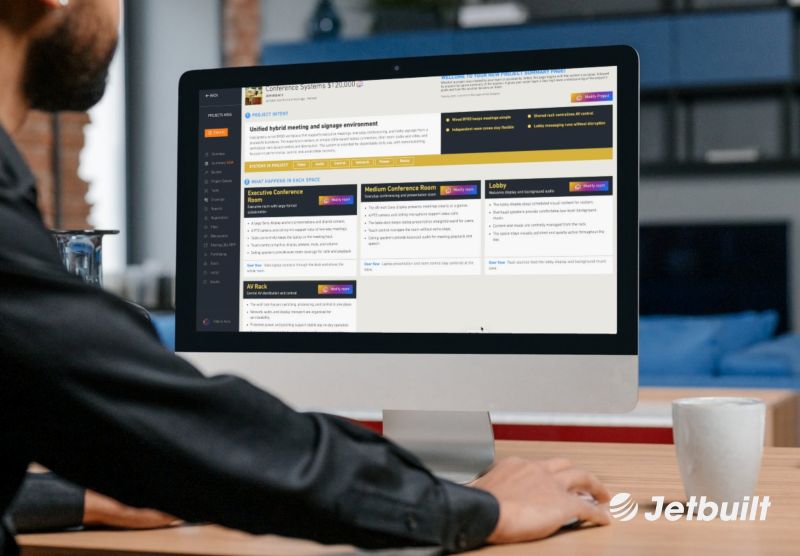
Jetbuilt has introduced Summary, a new feature that presents project goals, designed solutions and overall scope in a concise high-level view. Powered by Jetbot, Summary assembles this context instantly into an infographic-style overview built for executives, project teams and stakeholders across global organizations.
Key Takeaways
- Summary presents project goals, designed solutions and scope in a single high-level view.
- Jetbot assembles Summary instantly into an infographic-style layout of visual blocks.
- Executives and global teams can grasp project scope without reviewing every product, scope of work or price.
- Summary supports collaboration across departments, offices and regions.
- Integrators can share Summary with customers directly through Jetbuilt.
- Summary drops into the Proposal Builder as a templated page and carries into the PDF export.
What Is Jetbuilt Summary?
Summary is a new Jetbuilt feature that presents a project’s goals, the designed solutions and the overall scope in a concise high-level view. Visual blocks show the project need, the solution, the systems involved and how each space’s equipment contributes to that solution. Detailed equipment selections, scopes of work and pricing stay available within Jetbuilt for deeper review.
How Does Jetbot Assemble Summary?
Jetbot assembles Summary instantly, organizing project context into visual blocks rather than a long narrative. Stakeholders can scan those blocks to understand how the proposal fits together and see the connection between a customer’s needs and the recommended approach. The infographic-style layout replaces dense text with a view that’s quick to read and easy to follow.
How Does Summary Help Executives and Global Teams?
Summary helps executives and global teams understand a project without spending the time required to examine every product, scope of work and financial detail. It brings that context into one view, so users can grasp the project first and then decide whether a deeper review is necessary.

“Executives and other stakeholders often need to understand a project without spending the time required to examine every product, scope of work and financial detail,” says Paul Dexter, CEO and founder of Jetbuilt. “Powered by Jetbot, Summary instantly brings that context into one view, allowing users to understand the project before deciding whether a deeper review is necessary.”
How Does Summary Support Collaboration Across Teams?
Summary supports collaboration by giving team members across departments and locations a shared outline of a project’s objectives and proposed approach. Employees who join a project after its initial development can review Summary to understand its scope without reconstructing that information from individual project components. Whether joining a project in progress or reviewing work managed by another team, users get a clear picture fast.
Can Integrators Share Summary With Customers?
Integrators can share Summary with customers directly through Jetbuilt, giving clients a concise introduction to the proposed project. Customers get that high-level context alongside access to the supporting information behind it, so they can review as much detail as they want.
How Does Summary Work With the Proposal Builder?
Summary adds quickly as a page within Jetbuilt’s Proposal Builder, creating a templated proposal page that automatically pulls in the details entered within Summary. When the proposal exports as a PDF, the Summary page is included. That gives customers, executives and other proposal reviewers the same high-level project context directly within the finished proposal.