
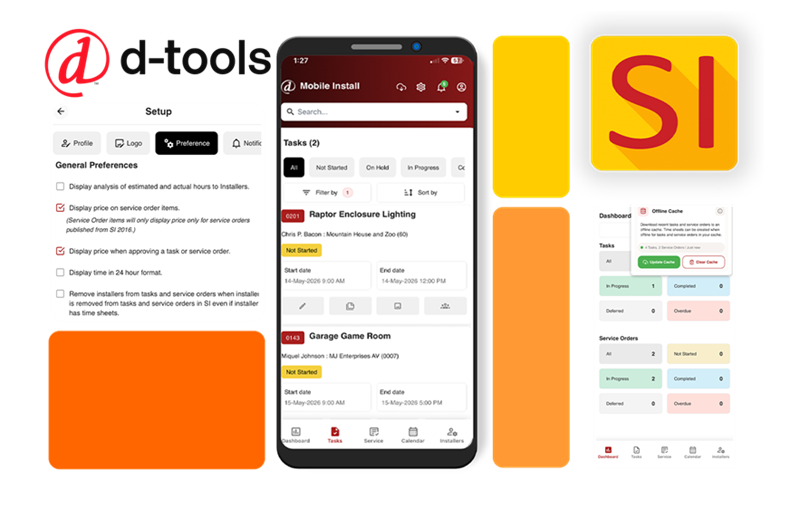
D‑Tools, Inc., provider of software solutions for the systems integration market, has announced the availability of the new D-Tools SI Mobile Install App, a native mobile companion app for D-Tools System Integrator (SI) designed specifically for installation and service teams working in the field.
What is the SI Mobile Install App?
According to the D-Tools, the SI Mobile Install App allows technicians real-time access to service orders, tasks, schedules, site documentation and project details directly from their mobile devices, helping teams stay productive, connected and accountable from anywhere.
The company remarks that a key enhancement in the new native app features expanded offline functionality, allowing technicians to continue working even when internet access is unavailable. Moreover, users can view assigned Tasks and Service Orders in read-only mode while offline and create Time Sheets that automatically sync once connectivity is restored.
Built for technicians, installers, and service professionals, the SI Mobile Install App delivers a streamlined mobile experience that mirrors the functionality of the existing SI Mobile Install web interface while adding the convenience and performance of a native mobile application.

What are the Key Features of the SI Mobile Install App?
D-Tools announced that SI Mobile Install App includes the following features:
- Dashboard Overview: View daily priorities, assignments and pending work at a glance.
- Service Orders: Access and update service orders, capture installed equipment details, serial numbers, MAC addresses and site item information directly from the field.
- Task Management: Track assigned tasks, update progress, complete field activities in real time.
- Time Sheets: Create and manage time sheets from the field, including support for custom fields and chronological exports.
- Calendar View: View scheduled work and appointments with customizable timeline views.
- Site Notes: Capture important observations, instructions and on-site details directly from the field.
- Barcode Scanning: Use your device camera to quickly scan barcodes for equipment serial number and MAC address entry.
- Photo Capture: Attach photos to service orders, tasks and site notes for complete documentation. Upload file transfers of up to 300MB for large drawings, project documents and media in the field.
- Offline Mode: Work without interruption even when internet is unavailable; all changes sync automatically when back online.
- Push Notifications (Coming Soon): Receive real-time updates on assignments, scheduling changes and task activity.
- Secure Access: Enterprise-grade authentication helps protect customer and project data.
Per the company, the SI Mobile Install App is for installation technicians, field service teams, maintenance professionals and project managers who need fast, reliable access to project and service information while on the move.
Is the App Available for Download?
D-Tools announced that the SI Mobile Install App is available now for download on the Apple App Store and Google Play.
The company also states that current D-Tools System Integrator subscribers and customers with an active Software Assurance agreement receive one Mobile Install resource for each SI license purchased. Additional Mobile Install licenses are available for a nominal monthly fee per user.