
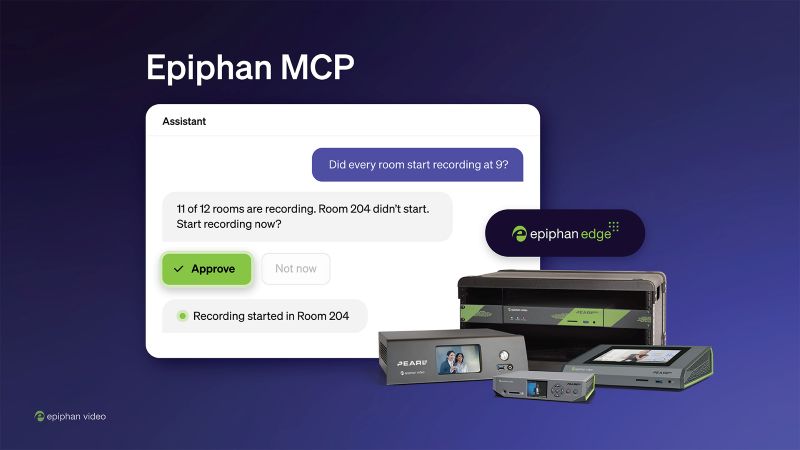
A stopped recording or an offline stream usually means opening a dashboard or walking to the room. Epiphan Video wants that fix to happen in a chat window instead.
The company has released read and write access for Epiphan MCP, its hosted Model Context Protocol server for Epiphan Edge. The update makes Pearl encoders agent-ready. AV and IT teams can now check device status and take action through Claude or ChatGPT using plain language.
Key Things to Know
- AI assistants can now act, not just report. Claude and ChatGPT can start recordings, launch streams, apply presets, reboot devices and update firmware across Pearl fleets.
- Every write action needs approval. The assistant asks the user to approve each change before it runs.
- Permissions follow existing roles. Access runs through the same OAuth sign-in as Epiphan Cloud, and the assistant can only do what the user’s Epiphan Edge role allows.
- Availability is limited to Premium plans. Write access works now on Epiphan Edge Premium plans for Pearl-2, Pearl Mini, Pearl Nano and Pearl Nexus.
What Is Agent-Ready AV?
Agent-ready AV is equipment that an AI assistant can check and control directly through an open standard. Routine work happens in a conversation, not in a separate management interface.
In Epiphan’s case, that open standard is the Model Context Protocol. It gives an assistant a structured way to read device data and send commands. Epiphan tests the server with Claude and ChatGPT.

What Is Epiphan MCP?
Epiphan MCP is a hosted MCP server that connects AI assistants to Epiphan Edge, the company’s device management platform. Until now, the server offered read access. The new release adds write access.
With read access, teams can ask about device status, storage, recording state and schedules in plain language. Write access closes the loop. A technician who spots a problem can fix it in the same conversation.
George Birchall, CEO of Epiphan Video, ties the value to both control and visibility across a room portfolio. “Epiphan MCP lets an AV team ask about every Pearl they manage and act on the answer,” he says. “It also gives them a live picture of every room they run, and that is the evidence teams need to make their spaces work better. That’s what agent-ready AV means to us.”
What Can AI Assistants Do With Epiphan MCP Write Access?
AI assistants can run the most common day-to-day encoder tasks across one device or many. Write access covers five groups of actions:
- Recording: Start, stop, pause and resume recording on one channel or many.
- Streaming: Create stream destinations and start or stop streaming.
- Scheduling: Create, extend, pause and resume scheduled events in Epiphan CMS.
- Configuration: Apply a saved configuration preset to a group of devices.
- Maintenance: Reboot devices and update firmware.
That list matters for fleet work. Pushing a preset or a firmware update to a group of encoders turns a room-by-room task into a single request.
How Does Epiphan MCP Keep Live Rooms Safe?
Epiphan MCP limits the assistant to what the signed-in user can already see and do. During OAuth sign-in, the user picks one team, and the assistant inherits that account’s visibility and Epiphan Edge role permissions.
Claude and ChatGPT also ask the user to approve each write action. Epiphan’s documentation flags actions that interrupt a recording or stream, such as reboots and firmware updates, so teams can schedule them for quiet hours.
Yusupha Touray, VP of Product at Epiphan Video, points to safety as the baseline requirement for this kind of control. “Letting an assistant change a device in a live room sets a high bar for safety,” he says. “The assistant can only do what the user’s role in Epiphan Edge allows, and Claude and ChatGPT ask the user to approve each write action. Teams get the speed of an assistant and keep full control of their rooms.”
Which Pearl Devices Support Epiphan MCP?
Write access is available now for Pearl-2, Pearl Mini, Pearl Nano and Pearl Nexus on Epiphan Edge Premium plans. Pause and resume recording require Pearl firmware 4.24.6 or later.
EC20 cameras support reboot and firmware update through Epiphan MCP. If you manage mixed fleets, check firmware versions before you promise clients the full feature set.
What Does Agent-Ready AV Mean for Integrators?
Agent-ready AV shifts routine support from dashboards to conversation, and that changes how you staff and sell managed services. A technician can diagnose and fix a stopped recording without a truck roll or a login to a separate tool.
The guardrails matter as much as the speed. Role-based permissions and per-action approval give you a clear answer when a client’s IT team asks who can change what in a live room.
The practical next step is an audit. Confirm which client rooms run supported Pearl models, which accounts sit on Premium plans and which devices need a firmware update.