
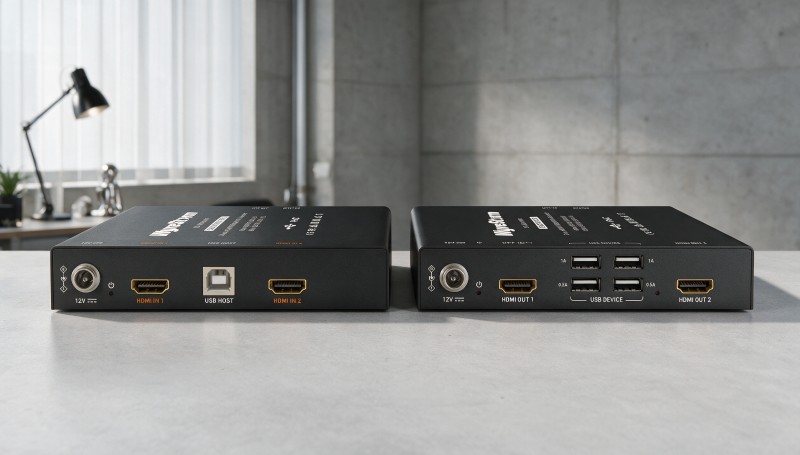
Dual-monitor workstations are standard in offices, training rooms and operator positions. Extending them hasn’t been simple. Moving the PC to a rack or control room usually means separate cable runs for each display, another path for USB and local power at both ends.
WyreStorm’s new EX-60D-KVM cuts that to one category cable. The dual HDMI KVM extender carries two independent displays, USB 2.0 and power between the transmitter and receiver, and it’s available now.
Key Things to Know
- The EX-60D-KVM carries two independent HDMI signals at up to 1080p60 4:4:4 plus USB 2.0 over a single Cat5e/6/6a/7 cable.
- Range reaches 60 meters with full-bandwidth USB 2.0 devices and 80 meters with USB HID peripherals such as keyboards and mice.
- Integrated Power over Cable (PoC) lets the transmitter and receiver run from a single power supply.
- The receiver includes four USB device ports for keyboards, mice, touchscreens, cameras and storage.
- The extender is available now through WyreStorm’s authorized distribution and reseller network.
What Is the WyreStorm EX-60D-KVM?
The EX-60D-KVM is a dual-display KVM extender that sends two HDMI signals and USB connectivity over one category cable. It lets you install the source computer in an equipment rack, control room or other remote location while the user keeps a full two-screen desktop at the desk.
The practical result is less infrastructure. You don’t need a separate cable path for each display.

What Video Performance Does the EX-60D-KVM Support?
The EX-60D-KVM supports two independent HDMI signals at up to 1080p60 4:4:4. Each display gets its own feed, so users keep a true extended desktop, not a mirrored image.
Full 4:4:4 chroma matters for workstation use. Text, spreadsheets and interface elements stay sharp, which is what desk users notice first.
How Far Can the EX-60D-KVM Extend Signals?
The EX-60D-KVM reaches up to 60 meters when using full-bandwidth USB 2.0 devices and up to 80 meters with USB HID peripherals such as keyboards and mice. It runs over Cat5e, Cat6, Cat6a or Cat7 cable.
That gap is worth planning around. If the workstation needs cameras or storage devices, design for the 60-meter limit. If it’s keyboard and mouse only, you get the extra 20 meters.
What USB Connectivity Does the Extender Include?
The EX-60D-KVM includes a USB host connection at the transmitter and four USB device ports at the receiver. Users can connect keyboards, mice, touchscreens, cameras, storage devices and other USB peripherals at the workstation while controlling the remote PC.
USB runs over the same cable as video. There’s no separate extender to spec, mount or troubleshoot.
How Does Power over Cable Simplify Installation?
Integrated Power over Cable lets the transmitter and receiver operate from a single power supply.
Fewer power bricks means a cleaner desk and a tidier rack. It also removes a common failure point when someone unplugs a power supply under the desk.
Why Did WyreStorm Develop the EX-60D-KVM?
WyreStorm developed the EX-60D-KVM to give integrators a simpler way to separate the computer from the workspace without losing either display or USB control. Joseph Gagliardi, product manager at WyreStorm, points to installation complexity as the problem the product targets.
“Dual-monitor workstations are everywhere, but extending them can quickly become more complicated than it needs to be,” Gagliardi says. “With the EX-60D-KVM, we wanted to give integrators a straightforward way to move the computer away from the workspace while keeping both displays and all the essential USB control at the user’s desk. Doing that over a single category cable makes the installation cleaner and much easier to manage.”
Where Does the EX-60D-KVM Fit in Commercial Projects?
The EX-60D-KVM fits dual-monitor corporate workstations, training environments, operator positions and light commercial control applications. These are settings where users need responsive access to a remote PC and won’t give up a two-screen workflow.
For integrators, the value shows up in labor and materials. One cable and one power supply per workstation shortens install time on multi-seat jobs, and the savings add up fast across a training room or operations floor.
How Can Integrators Buy the EX-60D-KVM?
The EX-60D-KVM is available now through WyreStorm’s authorized distribution and reseller network. Full specifications and product information are available at wyrestorm.com/product/ex-60d-kvm/.