Most integrators take a deposit before a single device goes on the wall. That cash shows up in the bank account, but the work it pays for hasn’t happened yet. When deposits get booked as revenue at invoicing, a company can look more profitable on paper than it really is.
D-Tools’ latest software update targets that gap. Release #104 of D-Tools Cloud, the company’s integration business platform, adds optional revenue recognition to project billing along with 56 other improvements.
Key Things to Know:
- D-Tools Cloud Release #104 is available to subscribers with 57 improvements.
- The lead feature is optional revenue recognition. It holds customer deposits as a liability until work is delivered, then releases them as earned revenue.
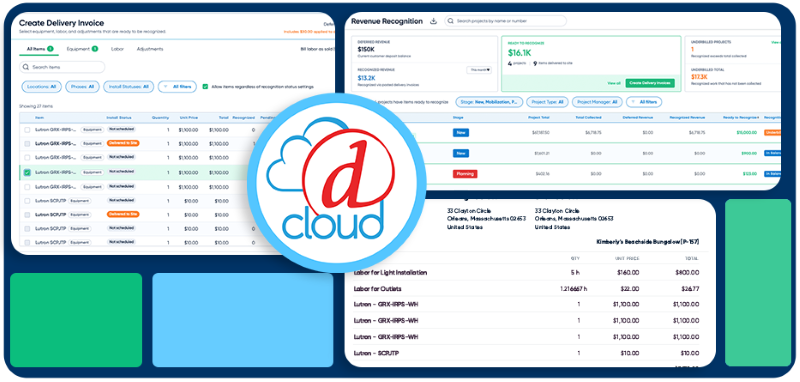
- A new Revenue dashboard shows deferred and recognized revenue across open projects and flags jobs that are over- or underbilled.
- Revenue recognition invoices export to QuickBooks Online, QuickBooks Desktop and Xero.
- The release also unifies staff scheduling, adds calendar-ready meeting invitations and introduces Labs, an early-access program for new features.
- Smaller updates include budgetary proposals without an Accept and Sign option and QR label printing to Brother thermal printers.
What Is in D-Tools Cloud Release #104?
D-Tools Cloud Release #104 includes 57 improvements, led by optional revenue recognition for project billing. The update also adds a Revenue dashboard, expanded accounting exports, unified scheduling, an early-access Labs program and several proposal and labeling updates.
The release is available to D-Tools Cloud subscribers beginning Nov. 12, 2026.

How Does Revenue Recognition Work in D-Tools Cloud?
Revenue recognition in D-Tools Cloud holds customer deposits as a liability until the work is delivered, then moves them into revenue when a delivery invoice is posted. The feature is optional, and companies decide whether to turn it on.
When project items reach a delivery status the company chooses, D-Tools Cloud flags them as ready to recognize. Every project then shows its deferred revenue and its recognized revenue side by side.
Requests for payment bill against the project’s payment schedule, with tax included in each requested amount. Clients pay them through D-Tools Payments the same way they pay invoices now.
D-Tools CEO G Paul Hess explains, “Most integrators collect a deposit before the first device is installed, and that money isn’t revenue until the work is delivered. Release #104 builds revenue recognition into project billing. As equipment and labor are delivered, D-Tools Cloud shows what’s been earned, what’s still deferred and which projects are over or underbilled across the whole business, so owners and their accountants can see earned and deferred revenue project by project.”
Why Does Revenue Recognition Matter for Integrators?
Revenue recognition matters because booking a deposit as revenue overstates income you haven’t earned yet and distorts every reporting period that follows. A big deposit in one month can make that month look strong and the install months look weak, even when the business is steady.
That distortion has real consequences. It can lead owners to overspend during a cash-heavy stretch or misread which projects actually make money. For companies that report to an outside accountant, a lender or a board, it’s also a compliance problem.
Separating collected cash from earned revenue gives owners a clearer read on margins and a cleaner set of books at tax time.
What Does the New Revenue Dashboard Show?
The Revenue dashboard shows deferred and recognized revenue across all open projects and flags jobs that are over- or underbilled. It can also turn eligible items into delivery invoices in bulk.
Overbilled jobs mean you’ve collected more than you’ve delivered, which creates an obligation to the client. Underbilled jobs mean you’ve done work you haven’t invoiced, which ties up cash you’ve already earned. Seeing both across the business helps project managers and owners catch billing gaps before they turn into cash flow problems.
Bulk invoicing cuts down on the manual work of closing out delivered items one at a time.
Can Integrators Turn Revenue Recognition Off?
Yes. Integrators can turn revenue recognition off and back on without losing invoices, history or accounting connections.
A settings page controls whether the feature is enabled, when revenue is recognized and how deferred revenue is labeled. That flexibility lets a company test the workflow, adjust it with its accountant or pause it without rebuilding records.
Which Accounting Systems Does Release #104 Support?
Release #104 exports requests for payment and delivery invoices to QuickBooks Online, QuickBooks Desktop and Xero. Deposits map to the liability accounts each company chooses, and Xero users can set up reusable tax mappings.
QuickBooks Online users get a dedicated settings tab that controls when each invoice type exports, with separate class and tax defaults for requests for payment and delivery invoices. When a mapping is missing, D-Tools Cloud now shows what needs fixing.
Purchase order and invoice numbers from D-Tools Cloud can now carry into QuickBooks Online. QuickBooks Online invoice numbers also appear in D-Tools Cloud invoice exports, so records match in both systems.
Matching numbers matter more than they might seem. When the project system and the books use different invoice numbers, reconciling payments turns into a manual hunt. Shared numbering cuts that back-and-forth between operations and accounting.
How Does Release #104 Change Staff Scheduling?
Release #104 records scheduled time once, at its full length, so every scheduling screen in D-Tools Cloud reads the same record. A half day off blocks half a day everywhere, not a full day on one screen and nothing on another.
Task assignments now include an availability check before a technician gets booked. Administrators can also record paid time off and sick time on the global calendar.
For integrators juggling multiple crews and job sites, conflicting schedules lead to no-shows, double bookings and unhappy clients. One source of truth for availability reduces those errors before they reach the field.
What Changed With Meeting Invitations?
Meeting invitations now go to required attendees with optional attendees copied, and they include a calendar file that works with Outlook, Google or Apple calendars. Reschedules update the existing calendar entry instead of creating a duplicate.
Recurring meetings now arrive as a single series. That keeps staff and client calendars clean and reduces the chance someone shows up for a meeting that already moved.
What Is D-Tools Labs?
Labs is a new D-Tools Cloud program that lets customers try features in early release before they’re widely available. Administrators turn on Labs previews in Settings, either for the whole company or for selected users.
Most previews can be switched off at any time. That gives integrators a low-risk way to test new tools with a few team members, shape their workflows around them and decide whether to roll them out more broadly.
What Other Updates Are in Release #104?
Release #104 also lets integrators send budgetary and planning proposals without an Accept and Sign option. Clients can review pricing without being able to authorize work.
That’s useful early in a sales cycle. A client might want a ballpark number for budgeting or board approval, and you don’t want that rough estimate signed as a binding agreement.
Other updates include:
- Client PO capture: Proposals can capture the client’s purchase order number at acceptance, which helps with commercial clients that require a PO on every invoice.
- QR label printing: A new desktop print agent sends QR labels to Brother thermal printers for tagging equipment and inventory.
- Company signing defaults: Companies can set default signing options for proposals.
- Default payment schedules: Each account can carry its own default payment schedule, so recurring clients get consistent terms without manual setup.
When Is D-Tools Cloud Release #104 Available?
D-Tools Cloud Release #104 is available to D-Tools Cloud subscribers beginning Nov. 12, 2026. Revenue recognition is optional, so integrators can enable it when their accounting team is ready.
What Does the Release Mean for Integrators?
Release #104 gives integrators a way to see what they’ve earned versus what they’ve only collected, without exporting data to a spreadsheet. For many integration firms, that distinction has lived with the outside accountant, if it’s tracked at all.
The practical value depends on how you bill. Firms that take large deposits on long projects stand to gain the most clarity. Before turning the feature on, talk with your accountant about recognition timing and which liability accounts to map, so the setup matches how your books already work.