When projection and LED displays share a stage, their colors rarely match on their own. That mismatch can distract audiences, frustrate sponsors and drag down production quality. At the Keller Williams Family Reunion Conference in Atlanta, Kean Production Services put AJA ColorBox and a purpose-built color pipeline to work to solve it. Here’s how the team pulled it off, and what integrators working live events can learn from the approach.
Key Things to Know
- Projection and LED technologies emit light differently, so their colors don’t align without deliberate calibration.
- Kean Production Services built a color management pipeline around AJA ColorBox to deliver color accuracy across a main LED wall and 24 projectors.
- The calibrated ColorBoxes measured under 2 dE2000 between main projectors and the LED wall, and around 3 dE2000 on the delay chains.
- AJA UDC-4K Mini-Converters handled signal conversion for both the in-venue feeds and the live stream from a single device.
- The team now sees HDR as the next opportunity for live events.
Why Doesn’t Color Match Across Projection and LED Displays at Live Events?
Color doesn’t match across projection and LED displays because the two technologies emit light in fundamentally different ways, introducing discrepancies the audience can spot. Standard color correction tools let a crew eyeball a fix, but that’s far from ideal, according to Chris Kean, founder of Kean Production Services. Working with Red Rock Ops LLC colorist Angel Banchs, Kean built a color management pipeline that keeps color accurate and dialed in across every screen.
Kean and his team deploy ColorBoxes regularly, whether they’re handling a large-scale corporate production, working with broadcasters, running graphics systems or providing equipment and stage management. Earlier this year they brought the devices to the Keller Williams Family Reunion Conference at the Georgia World Congress Center. The three-day event for real estate professionals featured a keynote stage with a main LED wall and 24 projectors across main and delay positions.
“We only had a few days to get everything set up and rehearsal-ready, so the pressure was tremendous. The goal is always for the audience to leave happy with their experience and excited to return, and color feeds into that,” Kean says. “Since projection and LED colors never align, ColorBox gives us the calibration tools we need to deliver consistent, color-accurate content across displays. It replaces guesswork with informed decision-making.”

How Did Kean Production Services Build Its Color Management Pipeline?
Kean Production Services built its pipeline by profiling every display before the crew arrived on-site, then targeting each one to Rec. 709. Ahead of the Keller Williams event, Kean enlisted Banchs to profile the LED wall and all 24 projectors. Banchs measured color with a Klein K-10A and a Colorimetry Research CR-250 spectroradiometer, using the CR-250 to profile the K-10A for each display type.
To keep the process mobile, Banchs drove patterns from a networked Portrait Displays G1 generator running off a mobile DIT cart with the meters on top. That setup let him move anywhere on the floor and measure displays wherever they sat in the room.
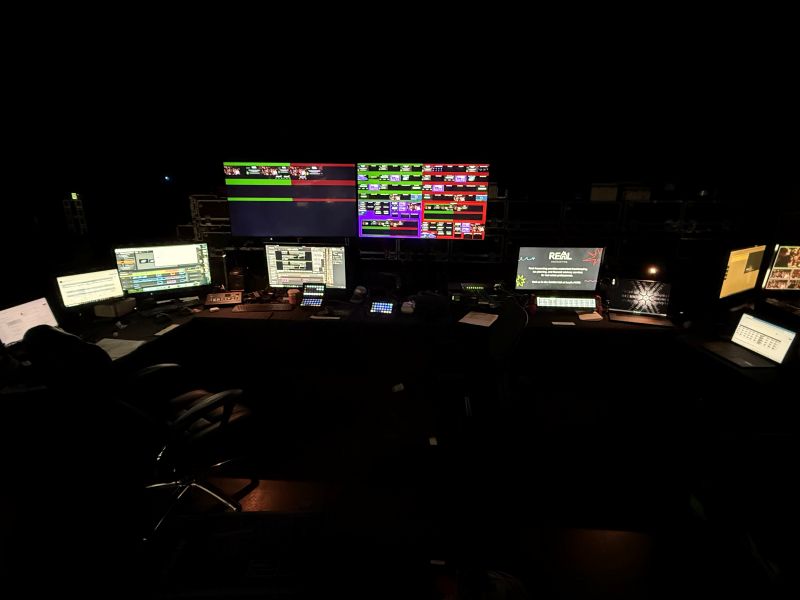
The production crew fed content into a Spyder X80 screen switcher, with outputs routed to the projectors and LED wall. LED correction lived in Brompton SX40 processors, while four ColorBoxes handled the projection path: one on two house-left projectors, one on two house-right projectors and one on each of the 10-projector delay chains, house left and house right.
“ColorBox is an elegant solution to a common challenge,” Kean says. “It’s small and portable, so it takes up little space and draws little power. You can easily integrate it on a hardware level, and with the software, you get all the dials and knobs you need to recreate video accurately.”
What Made the Color Workflow So Precise?
The workflow stayed precise because it paired careful measurement with live grading tools that let the team correct color in the room, in real time. Portrait Displays Calman read the measurements and generated the correction LUTs, which Banchs loaded into Pomfort Livegrade for live color grading before pushing them to the ColorBoxes on the projection path. The projectionists set center white on each unit, and the ColorBoxes carried the match across the different projector types.
The results held up under scrutiny. The calibrated ColorBoxes read under 2 dE2000 between the main projectors and the LED wall, and around 3 dE2000 on the delays, which were different units sitting in another area of the room.
Red was the hardest test. “This workflow was key because a lot of the content for the displays was red, which is difficult to color-match. Projection primaries simply cannot reach LED red, so our ColorBox workflow helps us define a common target that both technologies can hit and maps them to it. Before using the ColorBox, it looked completely jarring,” Kean says.
With Calman and Livegrade working together, Banchs could walk the convention floor, call up any zone while standing in front of the screen and grade live to account for ambient lighting or a quick request from the producers. “The tweaks weren’t big, but being able to make them in real time, in the room, is not something we have been able to do before using ColorBox,” Kean says.
How Did the Team Preserve Color Through Signal Conversion?
Courtesy / AJA
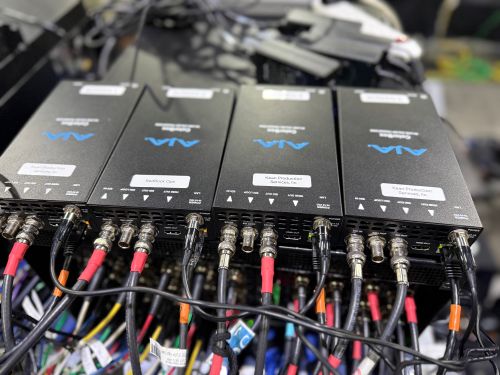
The team preserved color through conversion by using AJA UDC-4K Mini-Converters to move signals cleanly between formats without losing accuracy. On this project, the crew converted two iMac UltraHD 4K, Rec. 709 SDR signals from HDMI to SDI for input to a large 4K router and the screen switcher for the live LED feeds. At the same time, the Mini-Converters down-converted the UltraHD signal to HD 1080p SDR for an online live stream and recording.
Handling both jobs with one device saved the crew time and complexity. “The fact that we could handle both with one converter was so helpful,” Kean says. “The UDC-4Ks have allowed us to focus more on color when moving HDMI computer signals over SDI. They’ve also given us so much flexibility, because they solve many different signal flow challenges with such accuracy. This was a massive project, with little room for error, which is why we went with AJA tools. We just need our tools to work, and we trust AJA to do that.”
What’s Next for Color Accuracy at Live Events?
What’s next is HDR, which Kean sees as an underserved opportunity across live events. As demand for high-quality visuals keeps growing, he’s focused on bringing HDR into his widescreen productions and showing clients what it can add.
“HDR is an underserved area in our industry, largely because it’s complex. Now that we have tools like ColorBox to simplify HDR work, we want to show clients how we can improve the quality of their shows with it,” Kean says. “We haven’t found another product that delivers the same color accuracy as our AJA gear, and the reliability is unmatched. Even in the most critical situations, I can count on AJA gear to take care of us, so whenever given the opportunity, I opt for AJA.”
The Takeaway for Integrators
Consistent color across mixed display technologies is achievable when you profile carefully, measure accurately and grade live.
For integrators managing live events with both projection and LED, a disciplined color pipeline built around tools like AJA ColorBox and UDC-4K Mini-Converters turns a common headache into a repeatable process.
Solving color accuracy isn’t about eyeballing it anymore. It’s about building a workflow you can trust when the room fills and the pressure is on.