A single meeting room might see a USB-C laptop, an iPhone over AirPlay and a remote participant on the room camera in the same hour. Supporting that mix often means stacking a switcher, a wireless gateway and a USB extender, then making them work together.
WyreStorm Technologies’ new SW-660-TX-W puts those functions in one box. For integrators, that means fewer devices to spec, program and support in each room.
Key Things to Know:
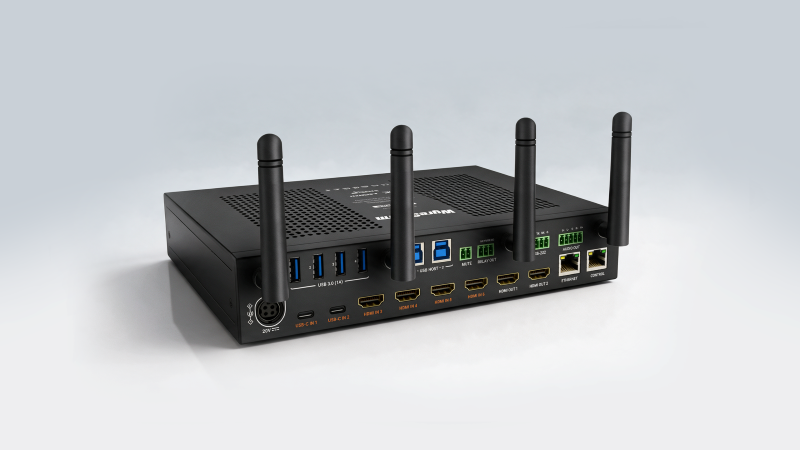
- WyreStorm Technologies launched the SW-660-TX-W, a six-input 4K presentation switcher for medium to large conference rooms and university classrooms.
- It has four HDMI inputs and two USB-C inputs. Both USB-C inputs deliver up to 100W of power to compatible laptops.
- Users can present wirelessly through WyreStorm’s APO-DG2 and APO-DG2-PRO, Apple AirPlay or Miracast.
- Dual HDMI outputs, multiview for up to four sources and four USB 3.0 device ports support hybrid and dual-display workflows.
- Dual Ethernet ports, VLAN capability and an encrypted API target IT-managed networks.
- The switcher is available now through WyreStorm’s authorized distribution and reseller network.
What Is the WyreStorm SW-660-TX-W?
The SW-660-TX-W is a six-input 4K presentation switcher that combines wired and wireless sharing, USB conferencing, dual-display output and multiview processing. WyreStorm built it for rooms where users need more ways to present and collaborate without more hardware to manage.
The goal is simple: one platform that handles several meeting styles. You don’t build a separate system around each requirement.

Which Rooms Is the SW-660-TX-W Built For?
WyreStorm designed the SW-660-TX-W for medium to large conference rooms and university classrooms. These spaces tend to host the widest range of users, devices and presentation styles.
A lecture hall might run a single instructor laptop one hour and a group project review the next. A boardroom often switches between in-person presentations and hybrid calls.
What Inputs Does the SW-660-TX-W Support?
The SW-660-TX-W has six wired inputs: four HDMI and two USB-C. That covers fixed room PCs and document cameras alongside the USB-C laptops most users now carry.
Wireless presentation sits on top of those wired connections. That gives users a third option without taking up a physical port.
How Does Wireless Presentation Work on the SW-660-TX-W?
Users can present wirelessly through WyreStorm’s APO-DG2 and APO-DG2-PRO, Apple AirPlay or Miracast. That covers Mac, iOS and Windows devices.
Support for native protocols cuts down on dongles and app installs for guests. Visitors can share from their own devices without a call to the help desk.
What Does 100W USB-C Power Delivery Mean for Users?
The two USB-C inputs support dynamic power delivery of up to 100W, so compatible laptops can present, reach room peripherals and charge over one cable. That removes the need for a separate laptop charger at the table.
One cable also means fewer things for users to plug in wrong. Fewer mistakes lead to fewer service calls.
How Does Multiview Work on the SW-660-TX-W?
Multiview puts up to four sources on screen at the same time. Teams and students can compare content side by side instead of handing control back and forth between presenters.
That matters most in collaborative sessions. Design reviews, group projects and comparison-heavy lectures all benefit when content shares one display.
What Can the Dual HDMI Outputs Do?
The SW-660-TX-W has two HDMI outputs. HDMI OUT1 supports up to 4K60 4:4:4, and HDMI OUT2 supports up to 4K30 4:4:4.
The outputs can run independently for matrix switching, sending different sources to each display. They can also support an extended desktop from a compatible USB-C source using Multi-Stream Transport (MST), so a presenter can show notes on one screen and slides on the other.
How Does the Switcher Handle USB Conferencing Peripherals?
Four USB 3.0 device ports share room peripherals, such as cameras, microphones and speakerphones, with the connected computer. Hybrid meetings then run through the same switcher that handles presentation.
The room’s conferencing gear follows whichever laptop is active. Users don’t need a separate USB switch or extender to make it happen.
What Does WyreStorm Say About the Launch?
WyreStorm says rooms now have to support far more workflows than they did a few years ago. Zvonimir Prokic, product manager at WyreStorm, points to the range of devices and presentation styles users bring into a single space.
“Rooms are being asked to do much more than they were a few years ago,” Prokic says. “People want to walk in with different devices, present wired or wirelessly, use the room camera and audio, work across two displays and sometimes compare several sources at once. The SW-660-TX-W brings those workflows together in one platform, so the room stays flexible without becoming harder for the user or the integrator to manage.”
What IT Management Features Does the SW-660-TX-W Include?
The SW-660-TX-W includes dual Ethernet ports with transparent or isolated network modes, VLAN capability, encrypted API communication and an HTTPS web interface for setup, control and monitoring. Those features target IT-managed environments in corporate and campus settings.
Isolated network modes and VLAN support let you separate AV traffic from the corporate network. Encrypted control and HTTPS access answer security questions before IT teams raise them.
Where Can Integrators Buy the SW-660-TX-W?
The SW-660-TX-W is available now through WyreStorm’s authorized distribution and reseller network. Full specifications are on the WyreStorm website.
What Does the Launch Mean for Integrators?
The SW-660-TX-W consolidates presentation switching, wireless sharing, USB conferencing and dual-display output into one device. That shrinks equipment lists and cuts down the integration work between separate boxes.
The trade-off is concentration. More room functions depend on a single device, so confirm output requirements, MST compatibility with client laptops and network policies with IT before you spec it.
For rooms that need to serve many users and meeting styles, one well-planned platform is easier to support than three loosely connected ones.