DisplayNote’s given education IT teams a new way to manage classroom technology at scale. The Belfast-based company extended its Central Manager platform to support Montage, its screen sharing software for shared teaching spaces. For integrators serving schools and districts, the move adds a central management layer to classroom collaboration deployments across Android and Windows environments.
Key Things to Know
- DisplayNote extended Central Manager to support Montage, its screen sharing software for shared teaching spaces.
- The platform lets education IT teams remotely manage, monitor and configure classroom devices from one place.
- It’s compatible with both Android and Windows environments and is available now.
- Montage supports content sharing through app and browser-based access, AirPlay, Miracast and Google Cast.
- For AV channel and display partners, the addition strengthens the value of classroom display and collaboration projects.
What Did DisplayNote Announce?
DisplayNote announced that it’s extended Central Manager to let education IT teams centrally manage Montage, giving schools and districts a more scalable way to oversee classroom technology. The update, available now, adds a centralized management layer for single sites and multi-site education estates alike. IT teams can remotely manage, monitor, configure and support classroom devices from one place, removing technology friction behind the scenes without changing how teachers and students use Montage in the room.
The company says the update is a way to support two sides of the same classroom experience. Montage keeps content sharing simple for the people in the room, while Central Manager gives IT teams the tools to manage the technology supporting that experience at scale.
What Problem Does Central Manager Solve for Schools?
Central Manager addresses the growing challenge of managing more rooms and devices across more sites without consistent visibility. Education IT teams aren’t just worried about whether technology works in a single classroom. They oversee growing numbers of rooms and devices, often spread across multiple locations, where different configurations and limited visibility create friction for everyone involved.

That friction lands differently depending on the role. For teachers, it can mean losing lesson time to troubleshooting. For students, it can interrupt the flow of learning. For IT administrators, it can mean reacting to problems room by room rather than managing technology consistently across the wider estate. Central Manager’s built to reduce those points of friction before they reach the classroom.
How Does Central Manager Work With Montage?
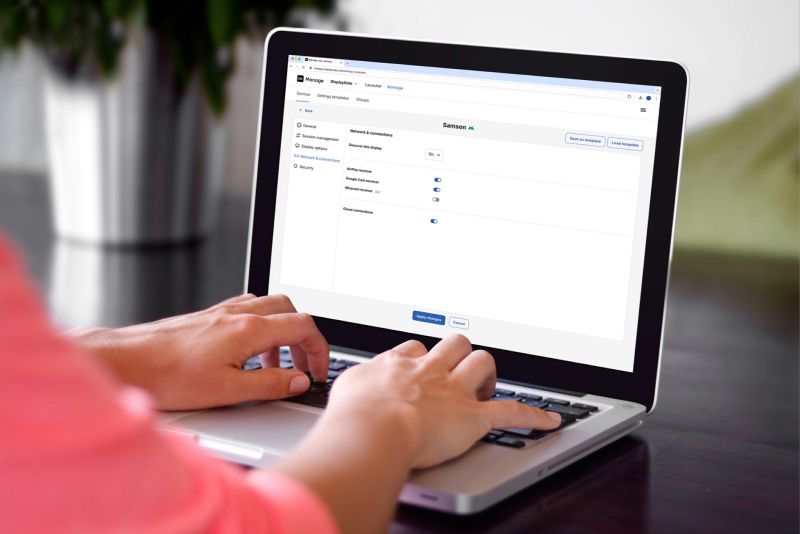
Central Manager works by adding a management portal that gives IT teams visibility and control over their Montage deployments. Through the Central Management Portal, administrators can see device health and room status, remotely manage devices, apply settings and configurations centrally and maintain a more consistent experience across classrooms, schools and districts.
Montage itself stays focused on the people in the room. The software lets teachers and students share content from a range of devices using app and browser-based access, AirPlay, Miracast and Google Cast, alongside capabilities including touchback, moderator control and broadcasting. For teachers, the management layer stays in the background. There’s no need to change how they use Montage or add steps to a lesson.
What Are DisplayNote’s Leaders Saying?
DisplayNote’s leaders says the update is a way to keep technology out of the way so teaching can flow. Ed Morgan, CEO of DisplayNote, says the goal’s to remove disruption from the classroom.
“The best classroom technology should help a lesson flow without becoming the focus of it. When teachers have to stop to troubleshoot, students lose momentum and IT teams are pulled into reactive support,” Morgan says. “By extending Central Manager into Montage, we’re giving IT teams greater visibility and control behind the scenes, so teachers and students can concentrate on what’s happening in the classroom rather than the technology making it happen.”
Joe McCallion, product manager at DisplayNote, says the value lies in solving problems before they reach the teacher.
“A big part of removing friction from classroom technology is giving IT teams the ability to manage it before an issue reaches the teacher. Central Manager gives administrators a clearer view across their Montage deployments, with the ability to manage devices and configurations more consistently,” McCallion says. “For the teacher, that management remains in the background. They can walk into the room, share content and get on with the lesson.”
Why Does This Matter for AV Integrators and Channel Partners?
This matters for integrators because it adds a central management layer to the classroom display and collaboration systems they design and support. For AV channel and display vendor partners, support for Montage within Central Manager helps customers maintain more consistent environments across schools, districts and campuses. That consistency can reduce support calls, simplify multi-site rollouts and strengthen the long-term value of a deployment.
The update also reflects DisplayNote’s broader approach to shared-space technology: reducing friction between people and the tools they use. By pairing simple screen sharing in the room with centralized management behind the scenes, the company’s helping schools move toward a model where technology supports the natural flow of teaching rather than interrupting it.
When Is Central Manager Available?
Central Manager’s available now for schools, districts and partners using Montage.
Schools, districts and partners can book a discovery call to learn more about managing Montage deployments through the platform.